Before I started building, I asked AI whether this was even worth doing. Here's what it said:
Do you think this is a good idea?
Yes, genuinely. A few reasons:
It solves a real problem
Every cloud pentester has the same frustration. Jumping between tools, re-entering targets, losing output. A unified workbench with shared context is actually useful day to day.The timing is good
Cloud pentesting is growing fast. AWS, Azure, GCP environments are everywhere and most tooling is still fragmented. There's a gap for something purpose-built and simple.It's a great portfolio piece
You're writing about it on awsomecloud.io as you build it. That's smart. It shows you can build tools, not just use them. That's the kind of thing that gets you noticed in job applications.The on-prem expansion makes sense later
Starting cloud-only keeps the scope tight. Once the foundation is solid, adding on-prem tools follows the same pattern.The only risks worth thinking about
Some tools like Pacu are interactive by design. Wrapping them non-interactively has limits. Keeping bundled tool versions up to date will need attention over time. And the disclaimer matters, make it clear this is for authorised use only.But overall, yes. Build it, document it, ship it.
Good enough for me. So here's what I built.
Every cloud pentesting engagement starts the same way. Open a terminal, install ScoutSuite, remember you also need Pacu, open another tab for Trufflehog, paste the target credentials four different times into four different tools, and try to keep track of what you've already run. It's messy, repetitive, and completely unnecessary.
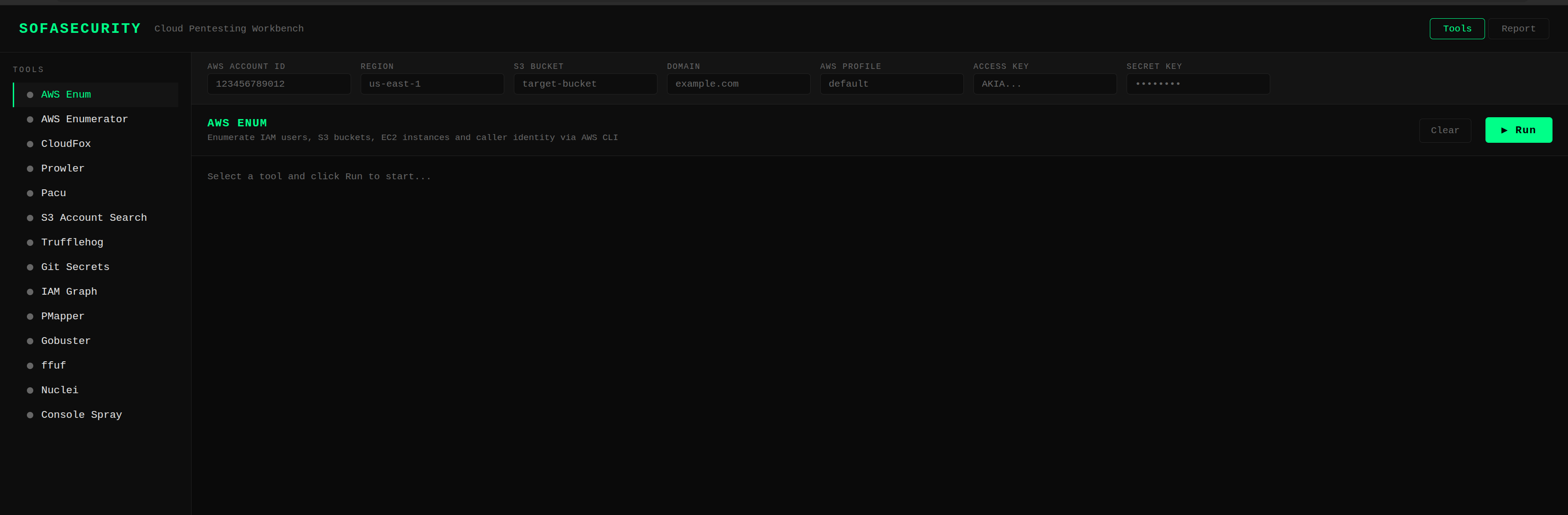
SofaSecurity is my attempt to fix that. One web UI, 14 cloud pentesting tools bundled inside a Docker container with shared target context across everything. Set your AWS account ID, region, bucket, or domain once and just pick a tool and run it.
Why build it?
Tools like Datadog and AWS QuickSight can give you cloud visibility, but they're built for large teams and cost accordingly. GoAccess and Grafana are solid self-hosted options but require significant setup. Nothing out there felt purpose-built for someone doing a focused cloud security assessment who just wants everything in one place with minimal friction.
The other motivation is portability. With Docker, you build it once and it runs identically on your laptop, a VPS, or a cloud VM. No dependency conflicts, no "works on my machine" problems. Just one command and you're running.
What's inside
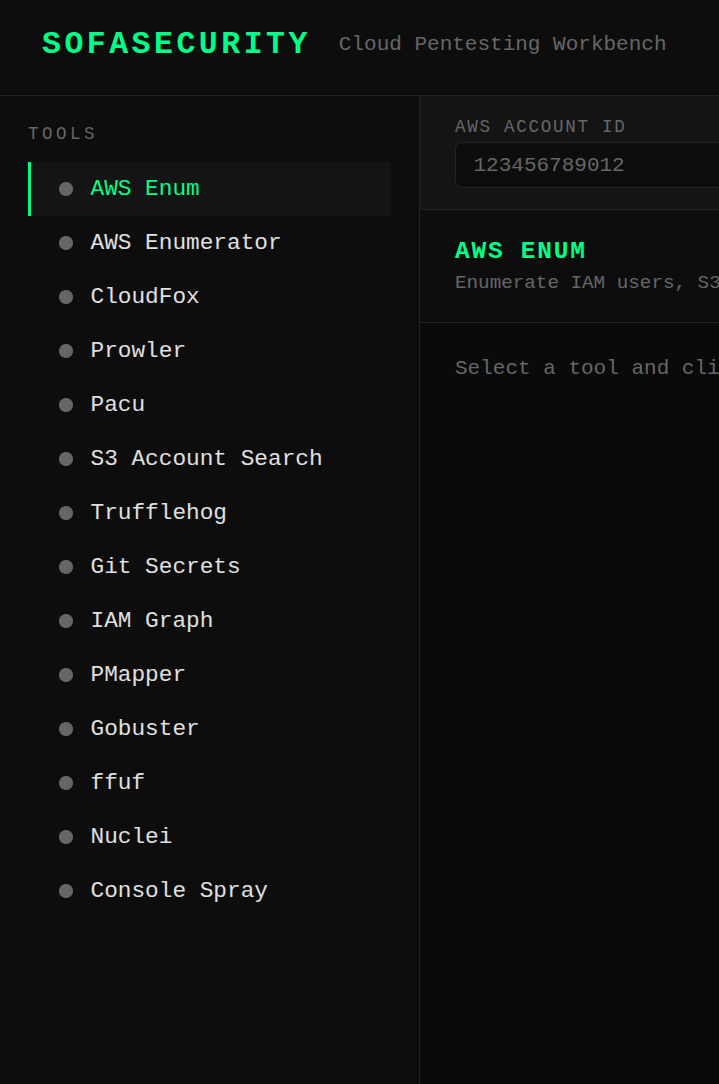
- AWS Enum - Quick recon via the AWS CLI: caller identity, IAM users, S3 buckets, EC2 instances
- AWS Enumerator - Deep resource enumeration across an entire AWS account
- CloudFox - Attack path finding across IAM, networking, and secrets
- Prowler - Compliance and security best practice checks
- Pacu - AWS exploitation framework
- S3 Account Search - Enumerate the AWS Account ID behind a target S3 bucket
- Trufflehog - Scan S3 buckets for exposed secrets and credentials
- Git Secrets - Scan git repos for accidentally committed AWS credentials
- IAM Graph - Visualise IAM permissions and relationships
- PMapper - Map IAM principals to find privilege escalation paths
- Gobuster - Directory and file brute-forcing
- ffuf - Fast web fuzzer for hidden endpoints
- Nuclei - Vulnerability scanning with AWS-tagged templates
- Console Spray - Password spray against the AWS management console
How it works

The backend is FastAPI with WebSockets. Each tool runs as a subprocess and streams output back to the browser in real time. The frontend is plain HTML, CSS, and JavaScript with a dark terminal aesthetic. No frameworks, no build steps.
Target context lives in the bar at the top of the UI. Fill in what you have: account ID, region, S3 bucket, domain, AWS profile, or access keys, and every tool picks up what it needs. If something is missing, the tool tells you clearly rather than failing silently.
Some tools need more than just a target. Pacu needs a module name, S3 Account Search needs a role ARN, Gobuster needs a wordlist. Rather than hardcoding these, each tool has a dynamic options panel that appears when you select it. Fill in what's needed, hit Run, and the output streams back live.
Getting it running
The code isn't public just yet. I'm doing a bit more testing before putting it out there. That said, the setup is intentionally low effort. You'll need Docker installed and that's pretty much it. One build command, open a browser, done. No manual installs, no config files to wrestle with.
I'll update this post with the GitHub link once it's ready. Shouldn't be long.
What's next
This is cloud-only for now, AWS specifically. On-prem tooling will come in a later version once the foundation is solid. I also want to add a findings panel that aggregates notable results across all tools, and the ability to export a session as a markdown report.
The code will be on GitHub. If you find a tool that should be in here, open an issue.
This tool is intended for use during authorised security assessments only. Always ensure you have explicit permission before testing any environment.