Kubernetes scares me, a lot. I've been somewhat lucky to avoid having to use K8s alot be it AKS, GKS, EKS, or on bare metal, but I've started to feel a bit guilty and to be honest, like there's a gap in my knowledge.
Most of the infrastructure I've worked on has been serverless or container-based without an orchestrator sitting in the middle. ECS, Lambda, the occasional EC2 instance with a bootstrapped service. At the moment I'm working on a simple project of keeping 10–20 Lambda functions up and making sure the AWS infra meets spec. But Kubernetes keeps coming up in job descriptions, in architecture discussions, in conversations about tooling and I can't keep nodding along.
What actually scares me
It's not the concepts. Pods, deployments, services, ingress I get the theory. What scares me is the operational surface area. The number of things that can go wrong silently. A misconfigured resource limit that quietly throttles your app. A node that's NotReady for reasons that take 45 minutes to diagnose. A networking issue between namespaces that shouldn't exist but does.K8s rewards people who've already broken it. And I haven't broken it yet.
So I'm going to break it on purpose
This post is the start of a series where I actually learn Kubernetes properly in conjnction with aiming for the
Kubestronaut certification, not by reading docs and nodding, but by deploying real things onto
a home-grown K8s cluster running on a cluster of Raspberry Pi 5s, breaking them, and writing
down what happened. Starting local with kind, then moving to EKS once I have a
handle on the basics.
If you're in the same boat competent in cloud, avoiding K8s — maybe follow along. Misery loves company.
Looking around, a lot of YouTube content points to using K3s, which is amazing, but I want
the real, full-fat kubeadm experience. I took a lot of inspiration from
Jeff Geerling and Travis Media.
Lets get building
My home lab consists of three Raspberry Pi 5's, One 16GB node as the controller called PiMaster and two small 8GB nodes called PiWorker1/2 attached to the Pi is a PoE/SSD top hat which enables me to use them with a PoE switch and to stick a small 128GB SSD to it. Very much not going to be needed but just there. I have carved up some stroage on my NAS and installed a the correct NFS toolage for Ubuntu Server 20.24 with all nodes are running.
The first step was to assumble the hardware, it didnt help that at the time of building this NAND prices have skyrocketed and the supplier
lost on of the nodes. After having all items needed to get building I totalled up and when "Ouch that cost a bit" but nevermind this cost of
learning something. the Pis have a SSD/PoE top had to basically kill two birds with one stone. Poweing the Pi's over my network switch and the
SSD to put a 128GB local storage drive so that I can have it running from the SSD and not the SD card. After and evening of prep I ended up with
something that looks like the below
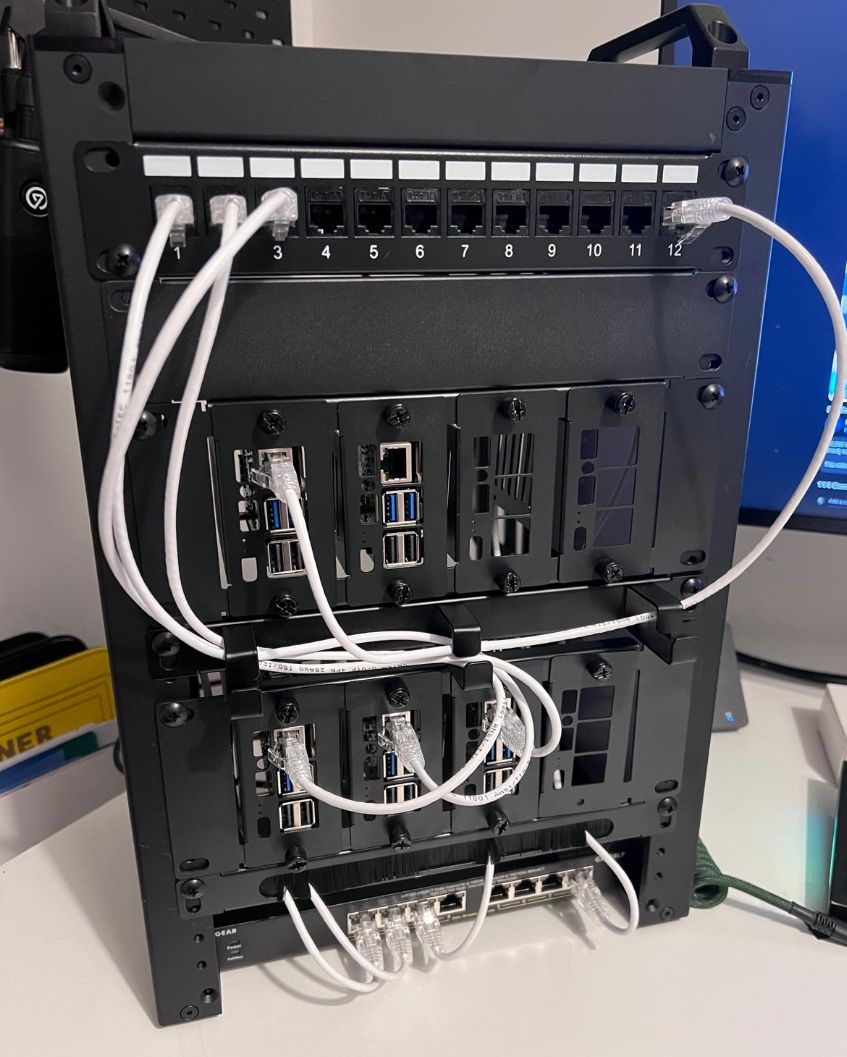
The total cost was about £600 for all the hardware n the image give or take. Im fairly impressed it doesnt look like an utter botch job. The setup took me about 2 hours and that was to attach all the top hats , build the rack and attach all the panels. For the keen eyed amoug you im sure you have seen an addtional two addtional Pi units, these are for upcoming projects for HTB/Tryackme/PwnedLabs in the near future.
The OS setup was fairly simple. I used Pi imager to select the version of ubuntu server and the target drive to flash. wash, rinse & repeat 5 time and I now three Pi servers running Ubuntu X. The next step was to run angry IP scanner on my network to see what I had to choose from and used the top end of my 192.168.50.X network.
Configuration
As mentioned able K3s is fantastic tool and very much suited to a bunch of Pis buit as mentioned by Travis its not the full on kubeadm setup which if I was going to learn and ever try and do some certification going the hardwerway was by far the better option. "Many homelab users prefer K3s because it’s lightweight, but I recommend kubeadm for a production-like setup. If you’re pursuing Kubernetes certifications, kubeadm gives you experience closer to real-world deployments. (Don’t worry, I’ll also provide an automation script later.)"
In part 2 ill go into a bit more detail on how things have been set and then follow up with what I think need to be the first applications to make this cluster actually useful!.